
Models
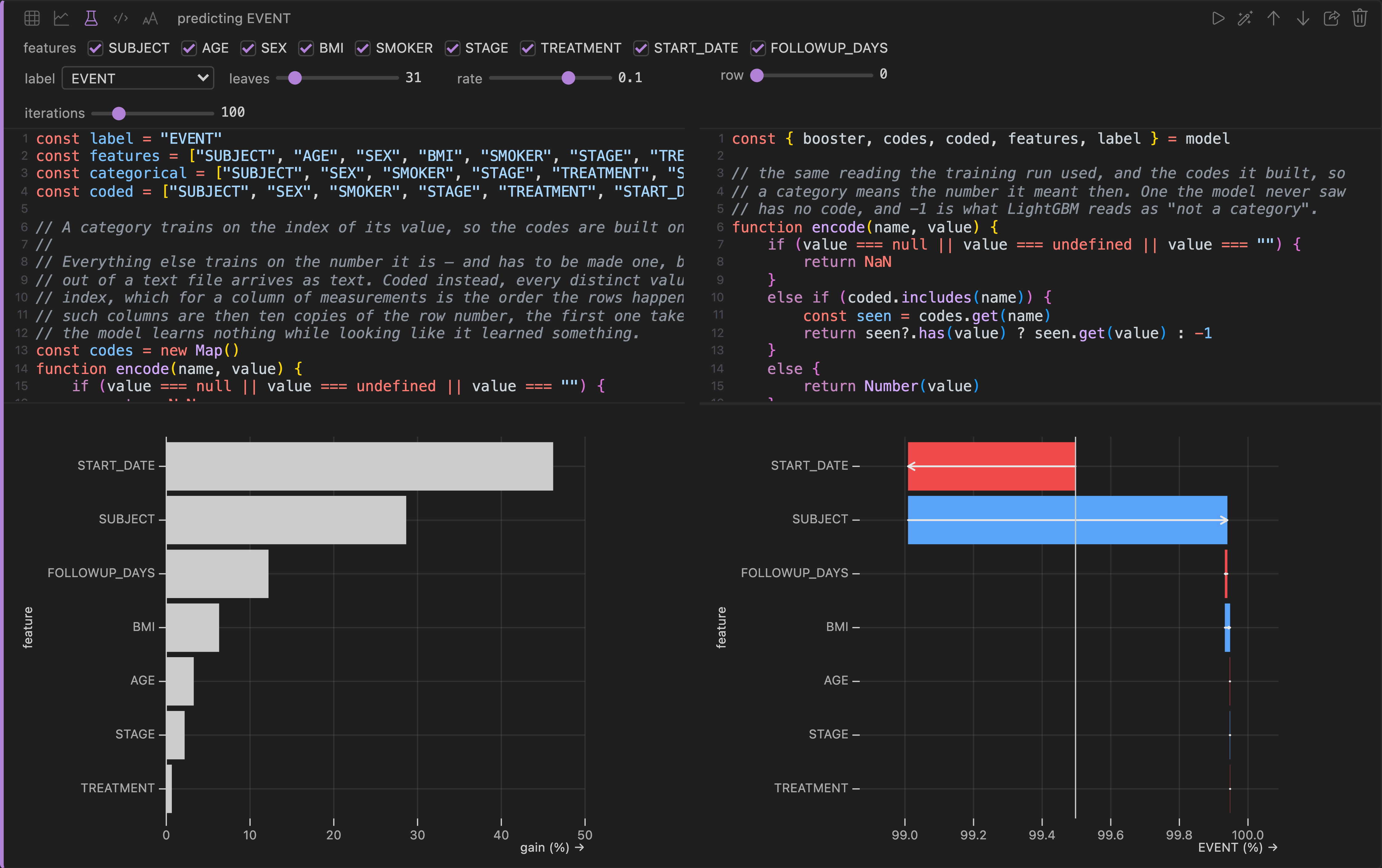
A model cell is gradient boosting — LightGBM, compiled to WebAssembly and running inside the app — over the rows the cell above produced.
Pick the label, the column you want predicted, and the rest comes from the same statistics the grid already drew: whether the question is which one or how much, which columns are worth training on, and which are row numbers, ids or coordinates that would teach the model the order the file was written in and nothing else.
The controls hide nothing
Leaves, rate and iterations are three sliders, and moving one prints the JavaScript underneath it — that printed source is what trains, so a slider and a hand edit end in the same place.
The two plots
Training draws what the model learned: the features ranked by their share of the total gain.
Prediction answers the other question — pick a row, and a waterfall walks from what the model says on average to what it said about that one row, feature by feature. Those contributions are TreeSHAP, exact and additive, so the steps add up to the prediction rather than approximating it.
Both plots show the same features in the same order, so the pair reads across: what a column is worth over the whole file, and what it did to this row.
It all runs where the data already is. A model over a bucket you are not allowed to copy out of is still just a local read — and the model can be shared without a single training row going with it.
Next: data lake tables.