
The notebook
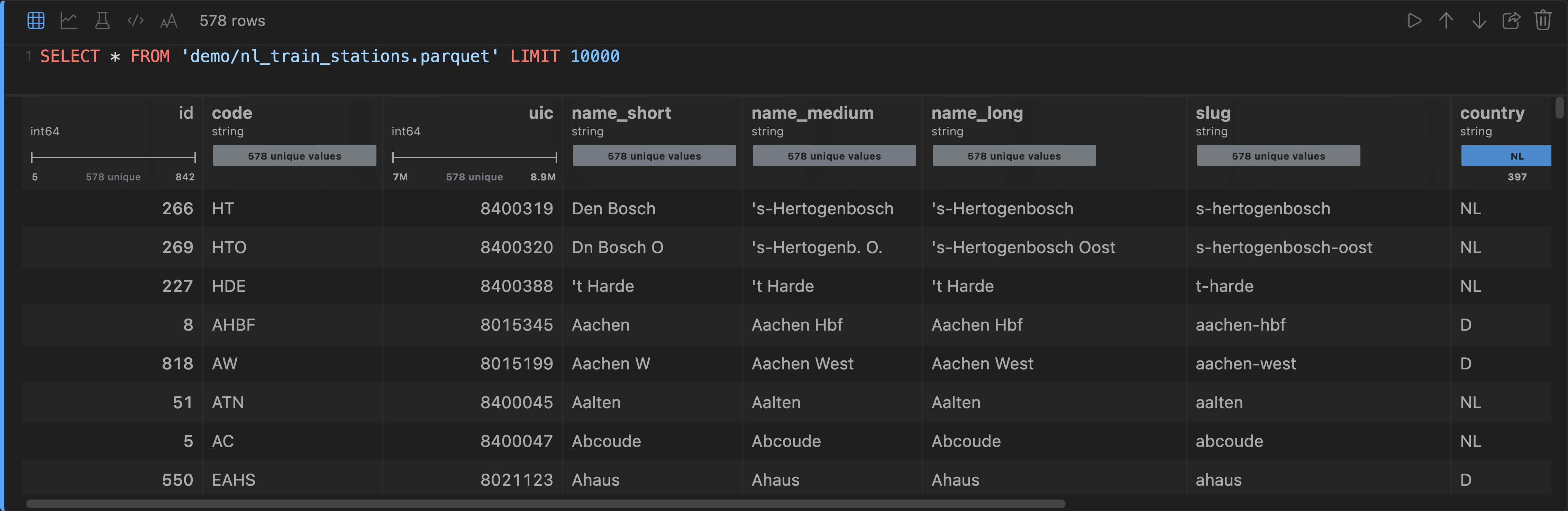
Open a table and it opens as a notebook: a column of cells, each one a few lines of code over its own output. The first two are already written — a SELECT * over the object you clicked, and a chart of what that query returned — so the file is queried and plotted before you have typed anything.
SELECT * FROM 'gs://sales-eu/orders/2026-08-24.parquet' LIMIT 10000The query runs on your machine, against the object where it lives. Nothing is staged into a temporary folder first: DuckDB reads the bucket directly, so a WHERE over a multi-gigabyte Parquet file touches the row groups it needs and no more.
Cells are piped, not shared
Each cell reads the rows produced by the nearest cell above it that produced any, so a query narrows the data and everything under it — the chart, the model, the next query — sees what came back.
Nothing re-runs on its own: a cell runs from its run button or Shift+Enter, so what is on screen is always something you asked for.
| Cell | What it is |
|---|---|
| Table | SQL, with the rows as a virtualized grid — column summaries and all |
| Chart | a plot of the rows above, as source you can edit |
| Model | gradient boosting over the rows above |
| Code | JavaScript over the same rows, with pandasjs — pd — already in scope |
| Text | markdown, rendered when you click away |
Adding and moving cells
The strip in the gap above a cell adds one there; hold it to pick the type. The arrows in a cell's toolbar move it, and the chevron on its left collapses everything but its output.
They are kept
Notebooks are kept per object. Reopen the file next week — in another window, or after a restart — and your cells are still there. A cell that had run comes back with its answer; a cell you added and never ran comes back unrun rather than running itself because you reloaded.
Next: SQL.